categories >
study
date : January 31, 2024
date : January 31, 2024
Selenium alert accept logic
alert accept using selenium
Accept Logic
build.gradle
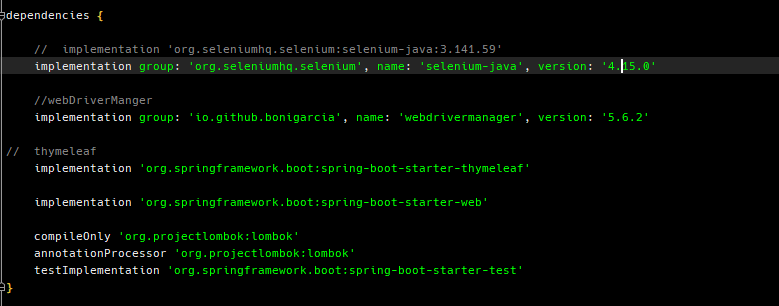
Dependencies
- Lombok
- Spring web
- thymeleaf
PopupController.java
@GetMapping("popupTest")
    public String popupTest(RedirectAttributes redirect) {

        log.info("[start Selenium popupTest]");

        System.setProperty("java.awt.headless", "false");
        try {

            //automatic web driver management through webdrivermanager
            WebDriverManager.chromedriver().setup();

            //remove being controlled option information bar
            ChromeOptions options = new ChromeOptions();
            options.setExperimentalOption("excludeSwitches", new String[]{"enable-automation"});;
            //서버에서 돌려서 안돼서 추가한 옵션
            options.addArguments("--no-sandbox");
//            options.addArguments("--headless=new");

            WebDriver driver = new ChromeDriver(options);
            driver.manage().timeouts().implicitlyWait(Duration.ofSeconds(10));
//            driver.manage().timeouts().implicitlyWait(Duration.ofSeconds(10));
            //==============================Scrape LOGIC START============================

            //GO TO PAGE
            log.info("naver open START");
            driver.get("http://localhost:8080/popup.html");

//            Thread.sleep(3000);
            //no thanks button click
            log.info("popupSelect and return true Start");
            WebElement button = driver.findElement(By.id("trueButton"));

            button.click();

            WebDriverWait wait = new WebDriverWait(driver,Duration.ofSeconds(10));
            wait.until(ExpectedConditions.alertIsPresent());

            driver.switchTo().alert().accept();

            wait.until(ExpectedConditions.alertIsPresent());

            String text = driver.switchTo().alert().getText();
            log.info("text result = {}", text);
            redirect.addAttribute("text", text);
//            model.addAttribute("text", text); // model에 text값을 같이 전달

            Thread.sleep(5000);
            driver.switchTo().alert().accept();

            log.info("disclose my and accpet button clicked");
            driver.quit();

        } catch (StaleElementReferenceException e) {
            log.info("noSuchEletmet = {}", e);

        } catch (Exception e) {

            log.info("Thread.sleep error [{}]", e);
        }

        return "redirect:result";
    }

@RequestMapping("result")
    @ResponseBody
    public String request(@RequestParam("text") String text) {
        return text;
    }
The popupTest Method is simple alert accept code using selenium
WebElement button = driver.findElement(By.id("trueButton"));

button.click();
Find button element and click it, then the alert prompt show up at the browser.
WebDriverWait wait = new WebDriverWait(driver,Duration.ofSeconds(10));
wait.until(ExpectedConditions.alertIsPresent());
wait until alert full loaded.
driver.switchTo().alert().accept();
Accept the Alert Prompt!!
String text = driver.switchTo().alert().getText();
            log.info("text result = {}", text);
            redirect.addAttribute("text", text);
Read Alert’s Message and save it String variable
and save throguth RedirectAttributes and transfer data to redirected page
@RequestMapping("result")
    @ResponseBody
    public String request(@RequestParam("text") String text) {
        return text;
    }
Take the value of variable through @RequestParam(”variable name”)
return it throguth @ResponseBody.
popup.html
<!DOCTYPE html>
<html lang="en">
<head>
    <meta charset="UTF-8">
    <title>popup</title>
</head>
<body>

<script>
  function button_event(){
    if (confirm("정말 삭제하시겠습니까??") == true){    //확인
      alert("끼요오오오옷");
      document.form.submit();
    }else{   //취소
      alert("canccel cancel");
      return false;
    }
  }
</script>

</body>

<button type="button" onclick="button_event();" id="trueButton">초안으로 저장할거임?</button>
</html>
💯Accept Logic with Headless
PopupController.java
//서버에서 돌려서 안돼서 추가한 옵션
            options.addArguments("--no-sandbox");
            options.addArguments("--headless=new");
add headless option
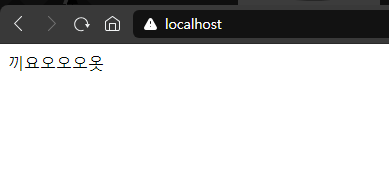
worked properly without web-broswer!!!